If you search the App Store for "NICE Guidance," you will find a lot of third-party tools, but you won't find an official app from the National Institute for Health and Care Excellence.
This is a common frustration. In a 10-minute consultation, you don't want to navigate a complex desktop website on your phone; you want an app icon that opens the guideline instantly.
The bad news: NICE retired their official "Guidance App" years ago (the shutdown began in 2018). The good news: you can build a workflow that is faster, safer, and better integrated than the old app ever was.
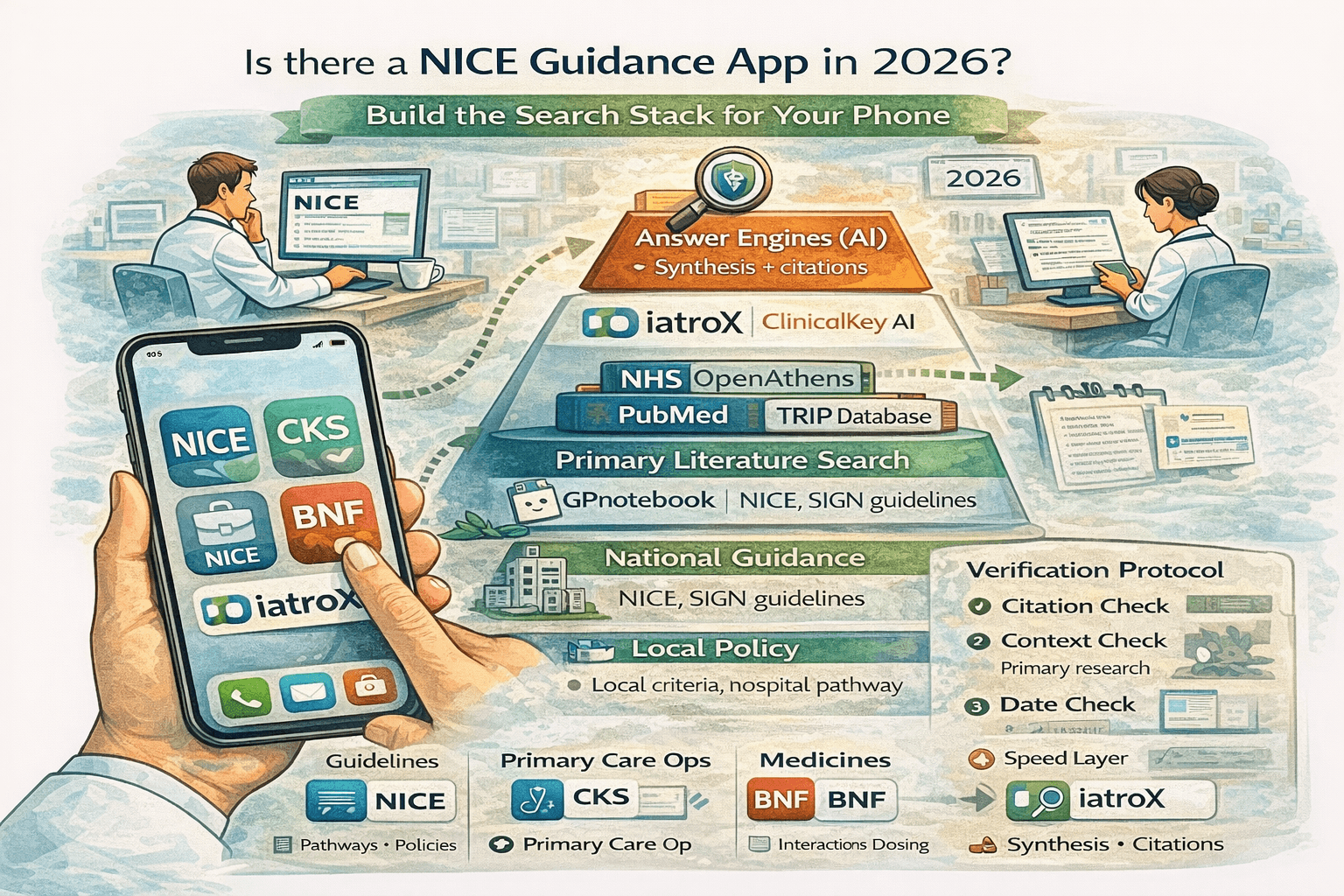
The 2026 Mobile Workflow There isn’t a current standalone NICE Guidance app. The fastest workflow is:
- Source-of-truth: Use NICE/CKS on mobile web (saved to home screen).
- Medicines: Use the BNF & BNFC App for offline dosing.
- Speed Layer: Add a search tool like iatroX for structured, cited answers that you then verify.
Is there an official NICE app in 2026?
Short answer: No.
NICE made a strategic decision to retire the "NICE Guidance" app to focus on making their website fully responsive for mobile devices. They concluded that maintaining a separate app that duplicated the website content was inefficient.
However, "no app" does not mean "no mobile workflow." It just means you need to set up your phone correctly.
The 60-second “NICE on your phone” setup
You can recreate the "app experience" in under a minute without downloading anything from the store.
Option A — Add NICE to your Home Screen
Both iOS (Safari) and Android (Chrome) allow you to turn a website into an app icon.
- Open cks.nice.org.uk (for primary care) or nice.org.uk (for hospital/policy) in your mobile browser.
- Tap the Share icon (iOS) or the Menu dots (Android).
- Select "Add to Home Screen."
- Rename it to "CKS" or "NICE."
It now sits on your home screen, opens full-screen, and behaves almost exactly like an app.
Option B — Build a 3-icon clinical ‘search dock’
To practice efficiently, arrange these three icons together on your phone's dock:
- NICE Guidance: (Shortcut to nice.org.uk) for pathways and evidence reviews.
- CKS: (Shortcut to cks.nice.org.uk) for "what do I do now" summaries.
- BNF Publications: (The official app) for offline drug monographs.
The “search stack” that actually saves time
In 2026, the most efficient clinicians use a "layered" search strategy. Do not start every search in the same place.
Layer 1 — Authority (NICE Guidance)
- What it is: The full evidence reviews and recommendations.
- When to use: When you need the definitive policy position, usually for a referral letter or a dispute over care.
Layer 2 — Primary Care Ops (NICE CKS)
- What it is: Summaries designed specifically for General Practice.
- When to use: For standard presentations (e.g., "Management of GORD," "Otitis Media antibiotics").
Layer 3 — Medicines (BNF App)
- What it is: The British National Formulary.
- When to use: Exclusively for interactions, contraindications, and dosing.
Layer 4 — Speed Layer (iatroX)
- What it is: An answer engine.
- When to use: When you have a complex question that cuts across multiple guidelines.
- Example: "Can I prescribe nitrofurantoin in a patient with eGFR 42?"
- Instead of opening the renal guidelines and the UTI guidelines, you Ask iatroX. It provides a clear, cited answer by checking its curated library of national guidelines.
The Safe Pattern: Ask iatroX for a structured, cited answer → Open the link to the cited NICE/CKS/BNF source to confirm → Proceed using judgement.
How to search NICE faster (3 tactics)
Tactic 1 — Decide the question type first
- "What is the dose?" → Open BNF (Don't use NICE).
- "What is the referral criteria?" → Open NICE (Don't use BNF).
- "How do I manage this condition?" → Open CKS.
Tactic 2 — Use a one-line query format When searching, be specific. Instead of just "Asthma," search:
- "Asthma diagnosis under 5"
- "Hypertension step 4 treatment"
- "Gout flare prophylaxis duration"
Tactic 3 — Save what you re-use You likely look up the same 10 things repeatedly (e.g., Head Injury CT criteria, Sepsis Red Flags). Don't search for these every time. Bookmark the specific CKS Leaf Page directly to your browser's favourites folder named "Clinic."
Where iatroX fits
iatroX is not a replacement for NICE or CKS; it is the glue that helps you find information within them.
Think of iatroX as your "intelligent index." It doesn't create clinical rules; it retrieves them.
- Search Layer: Use Ask iatroX to find the right guideline instantly.
- Navigation: Use the Knowledge Centre to browse guidelines by topic hub.
- Precedent: Check the Q&A Library to see how other clinicians have applied NICE guidance to real-world cases.
FAQ
Is there an official NICE app? No. The official NICE Guidance app was retired. You should use the mobile-optimised website or the official BNF app for medicines.
Why was the NICE Guidance app retired? NICE moved to a "digital-first" web strategy, ensuring their website works perfectly on all screen sizes, removing the need for a separate app that requires constant updates.
How do I search NICE faster on mobile? Save the CKS website to your home screen so it acts like an app. For complex queries, use a tool like iatroX to find the specific section of the guideline you need.
What’s the fastest way to get a cited answer and then verify it? Use an answer engine like iatroX to generate a summary. Then, crucially, click the citation number to open the original NICE document and verify the advice matches the source.
Is iatroX a substitute for NICE or CKS? No. iatroX is a search and retrieval tool. NICE and CKS remain the authoritative sources of truth for UK clinical practice.